Operating modes
A PiRogue sits between the devices it analyzes and the Internet. It has an external interface, connected to the Internet, and an isolated network, on which the analyzed devices are connected. Everything those devices send goes through the PiRogue, which can then capture and inspect it. The isolated network also keeps a potentially compromised device away from the rest of your network.
How the analyzed devices reach the isolated network depends on the operating mode.
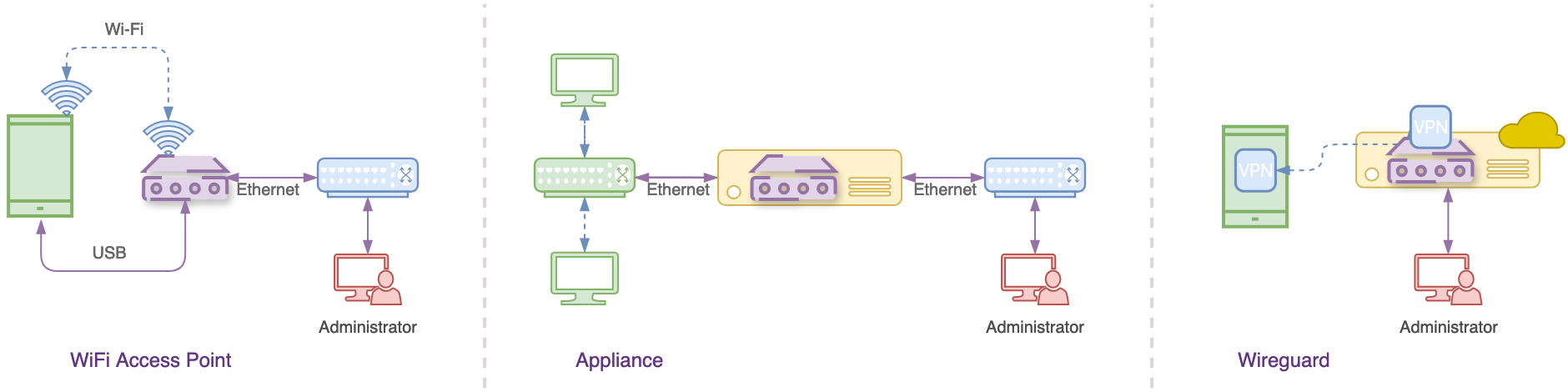
Access point
The PiRogue creates a Wi-Fi network, and the devices to analyze connect to it. This is the historical mode of the PiRogue, on a Raspberry Pi whose Ethernet port is connected to the Internet and whose Wi-Fi chip serves the isolated network. It is also the mode of a laptop with a wired and a wireless interface.
It requires the device to be physically close to the PiRogue.
Appliance
The isolated network is a second wired interface. The devices to analyze are connected to it, directly or through a switch, or are virtual machines on an isolated virtual network. The PiRogue acts as their gateway, DHCP and DNS server.
It suits a lab, to analyze computers or other virtual machines.
VPN
The PiRogue runs a WireGuard VPN server, and the devices to analyze connect to it with the WireGuard application. The isolated network is the VPN. A single network interface is enough, so a PiRogue in VPN mode can be a virtual machine or a server rented from a hosting provider.
Because the device only needs an Internet connection, it can be anywhere. This is what makes remote device monitoring possible: the PiRogue serves as an emergency VPN server for a person who is far from any PiRogue.
How the mode is chosen
You don't choose the mode: it is detected when pirogue-base is installed for the first time, from the network interfaces of the machine.
- The external interface is the one used to reach the Internet.
- If there is another interface with Wi-Fi capabilities, the PiRogue runs in access point mode on it.
- Otherwise, if there is another wired interface, the PiRogue runs in appliance mode on it.
- Otherwise, the machine only has a single interface, and the PiRogue falls back to the VPN mode.
The details of this detection, and its limits, are in System integration. To check the mode of your PiRogue, see Default configuration.