Check a device for signs of compromise with MVT
This guide shows how to use the Mobile Verification Toolkit (MVT), pre-installed on the PiRogue, to look for traces of compromise on an Android or an iOS device. To understand consensual forensics, see Consensual device forensics.
Disclaimer
Mobile Verification Toolkit (MVT) is a tool to facilitate the consensual forensic analysis of Android and iOS devices, for the purpose of identifying traces of compromise.
MVT's purpose is not to facilitate adversarial forensics of non-consenting individuals' devices. The use of MVT and derivative products to extract and/or analyse data originating from devices used by individuals not consenting to the procedure is explicitly prohibited in the license.
MVT a.k.a Mobile Verification Toolkit is developed and maintained by Amnesty International. It is not maintained by the PTS team.
MVT is pre-installed on PiRogue 2.x only. On PiRogue 3.x, install it first by following the MVT installation instructions.
Download the indicators of compromise
Before using MVT, be sure to pull the IOCs from Amnesty International's git repository.
To do so, on your PiRogue, run the following command
mvt-android download-iocs
Check an Android device
First of all, you have to connect the target device with USB to your PiRogue. On the device, you have to enable ADB in the Developer Settings. If the device is rooted, you should enable root for ADB only. On the Android device select Transfer files by taping on Android System - USB charging (in the list of notifications).
NB: all the following commands have to be executed on your PiRogue.
Then, run the following command:
adb devices
It should give an output similar to:
* daemon not running; starting now at tcp:5037
* daemon started successfully
List of devices attached
2[redacted]e        device
Before running MVT, you have to kill the ADB server
adb kill-server
Finally, launch MVT and follow its official documentation.
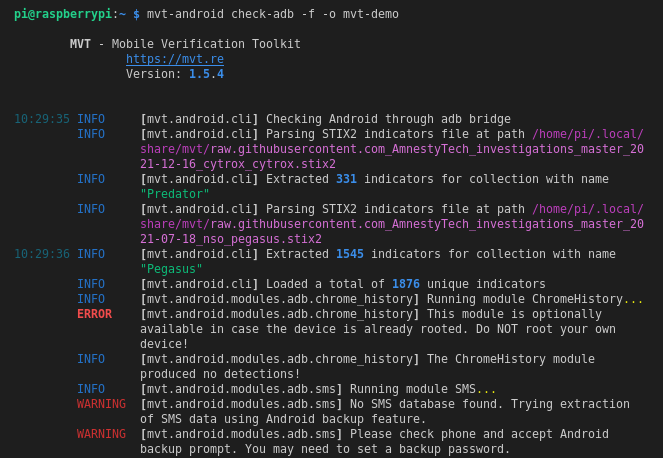
Below is an example of use of MVT.
mvt-android check-adb -f -o mvt-demo
It might produce an output similar to
Check an iOS device
Prepare the iOS device to be analyzed
First of all, you have to connect the target device with USB to your PiRogue.
NB: all the following commands have to be executed on your PiRogue.
Once connected, start the USB mixer by running the following command
usbmuxd
If usbmuxd is not found, install libimobiledevice. Run the following command
sudo apt install libimobiledevice-utils
The iOS device may be asking you if you trust the connected computer, trust it. Then, check if your iOS device is correctly recognized by running
ideviceinfo
The previous command would print various information regarding your device.
Backup the iOS device
In order to get as many information as possible, you have to turn backup encryption on by running
idevicebackup2 backup encryption on -i
Then backup the iOS device by running
idevicebackup2 backup --full backup/
Once done, you can unplug the iOS device. Run ls -l backup to get the name of the backup.
Analyze the backup
Run the following command to decrypt the backup
mvt-ios decrypt-backup -p <backup password> -d decrypted backup/<backup name>
For more details and options, check the MVT documentation regarding the backup password. If you have backed up this phone using iTunes, the backup password is the same as the one you provided in iTunes.
Next, analyze the backup with mvt-ios
mvt-ios check-backup -o checked decrypted
Finally, check the the results listed in the checked folder
ls -l checked
The folder checked contains several JSON files. Any IOC matches are stored in JSON files suffixed by _detected.
Going further
To enhance your MVT skills and knowledge, explore these valuable resources:
- MVT Documentation: This comprehensive guide provides in-depth instructions for using MVT effectively.
- OWASP Mobile Application Security Testing Guide (MASTG): Learn security concepts for mobile applications with the OWASP MASTG.