Dashboard
The dashboard of a PiRogue is a Grafana dashboard that shows, in near real time, the network connections of the connected devices and the security alerts raised by Suricata.
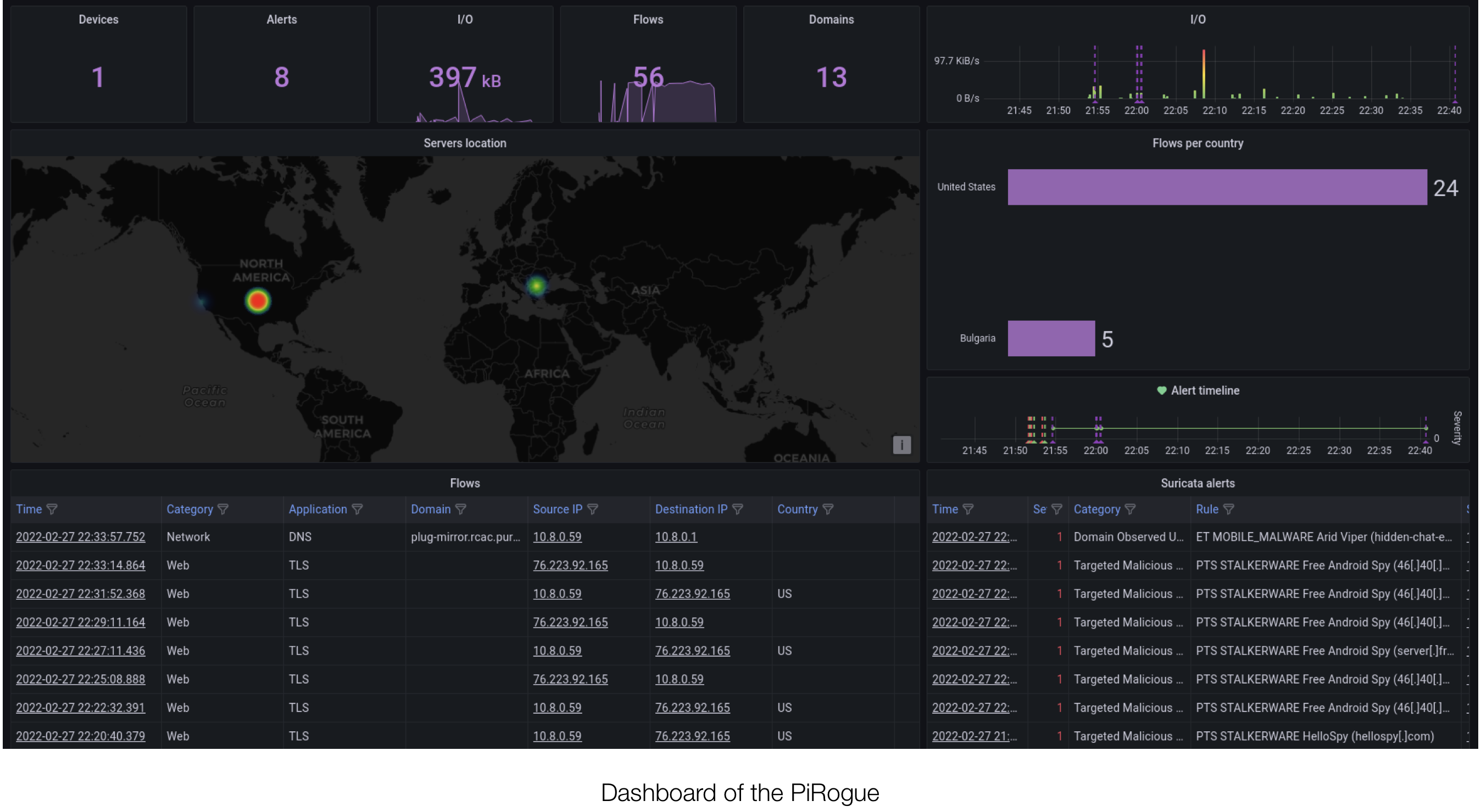
pirogue-dashboard 2.0.3 (Debian 12) and 3.0.0 (Debian 13) ship a redesigned dashboard, with improved accessibility and usability. Its layout can differ from the screenshots of this page.
The PiRogue keeps 5 days of history. Older data is automatically deleted. To keep it, see Export the alerts and flows of a PiRogue.
The time picker at the top right sets the period displayed by every panel.
General statistics
Five figures summarize the selected period:
- Connected devices: the number of different devices that connected to the PiRogue
- Security alerts: the number of alerts raised by Suricata rules, which may indicate an intrusion attempt, malicious activity or a policy violation
- Network I/O: the amount of data exchanged between the devices and the Internet
- Network flows: the number of communication sessions between the devices and remote servers
- Contacted domains: the number of different domain names contacted
World map
The location of the servers the devices communicated with. A quick way to spot a country you did not expect.
Network flows
One row per network flow:
| Column | Meaning |
|---|---|
| Time | When the flow started |
| Category | The type of traffic, as classified by NFStream |
| Application | The application that generated the flow |
| Domain | The name of the contacted server |
| Source / Destination | The IP addresses of both ends of the flow |
| Country | Where the remote server is located |
| Volume | The amount of data exchanged |
The list can be sorted and filtered.
Security alerts
One row per alert raised by Suricata:
| Column | Meaning |
|---|---|
| Time | When the alert was raised. Click it to open the details of the alert |
| Severity | How urgent the detected threat is |
| Category | The type of threat |
| Signature | The name of the rule that matched |
| Source / Destination | The IP addresses involved. Depending on the rule, the source is the origin of the threat or the destination is the target |
To find the rule behind an alert, see Find the rule behind an alert.